Explore Key Features of Apache APISIX AI Gateway
On this page
- Why AI Traffic Needs Additional Gateway Controls
- Proxy Requests to Supported Model Providers
- Configure Multi-Model Routing and Resilience
- Enforce Token-Based Usage Limits
- Cache Completed LLM Responses
- Apply Purpose-Specific Prompt and Content Controls
- Add a Documented RAG Retrieval Step
- Observe AI Traffic at the Gateway
- Use API and AI Controls in One Gateway
- Conclusion
The Apache APISIX AI Gateway applies model proxying, configured routing, response caching, token limits, prompt controls, retrieval, and gateway-level observability to LLM traffic through open-source plugins. This article maps those capabilities to the APISIX plugins that implement them.
Why AI Traffic Needs Additional Gateway Controls
LLM requests share many requirements with ordinary API traffic, including authentication, routing, rate limiting, resilience, and observability. They also introduce provider-specific request formats, token-based consumption, long-running streamed responses, and prompt-processing requirements.
Apache APISIX handles these concerns on the network path between an authorized application and configured model endpoints. It does not select tools, orchestrate agent workflows, evaluate answer quality, or replace application-level authorization. Those responsibilities remain in the application and AI platform layers.
Proxy Requests to Supported Model Providers
The ai-proxy plugin forwards requests to documented model providers and OpenAI-compatible endpoints. It can transform supported request formats, attach provider credentials from gateway configuration, and expose a consistent application-facing endpoint.
Provider compatibility depends on the selected APISIX provider type and the upstream API. Teams should verify request and response fields for each provider instead of assuming every model implements the same interface.
Configure Multi-Model Routing and Resilience
The ai-proxy-multi plugin distributes requests across configured model instances. Its documented routing policies include weighted round robin and consistent hashing, with optional health checks, bounded retries, and fallback behavior.
APISIX 3.18 also supports a semantic routing algorithm. Operators provide example prompts for each instance and configure an embedding service; the plugin compares the incoming prompt with those examples and selects the closest instance that clears the configured threshold. This is configured intent routing, not automatic optimization based on model cost, latency, answer quality, or business outcomes.
Semantic routing does not participate in health checks, retry, or the normal fallback strategy. Its designated fallback is used only when no instance clears the similarity threshold or the embedding request fails. Weighted round robin and consistent hashing continue to use their documented resilience options.
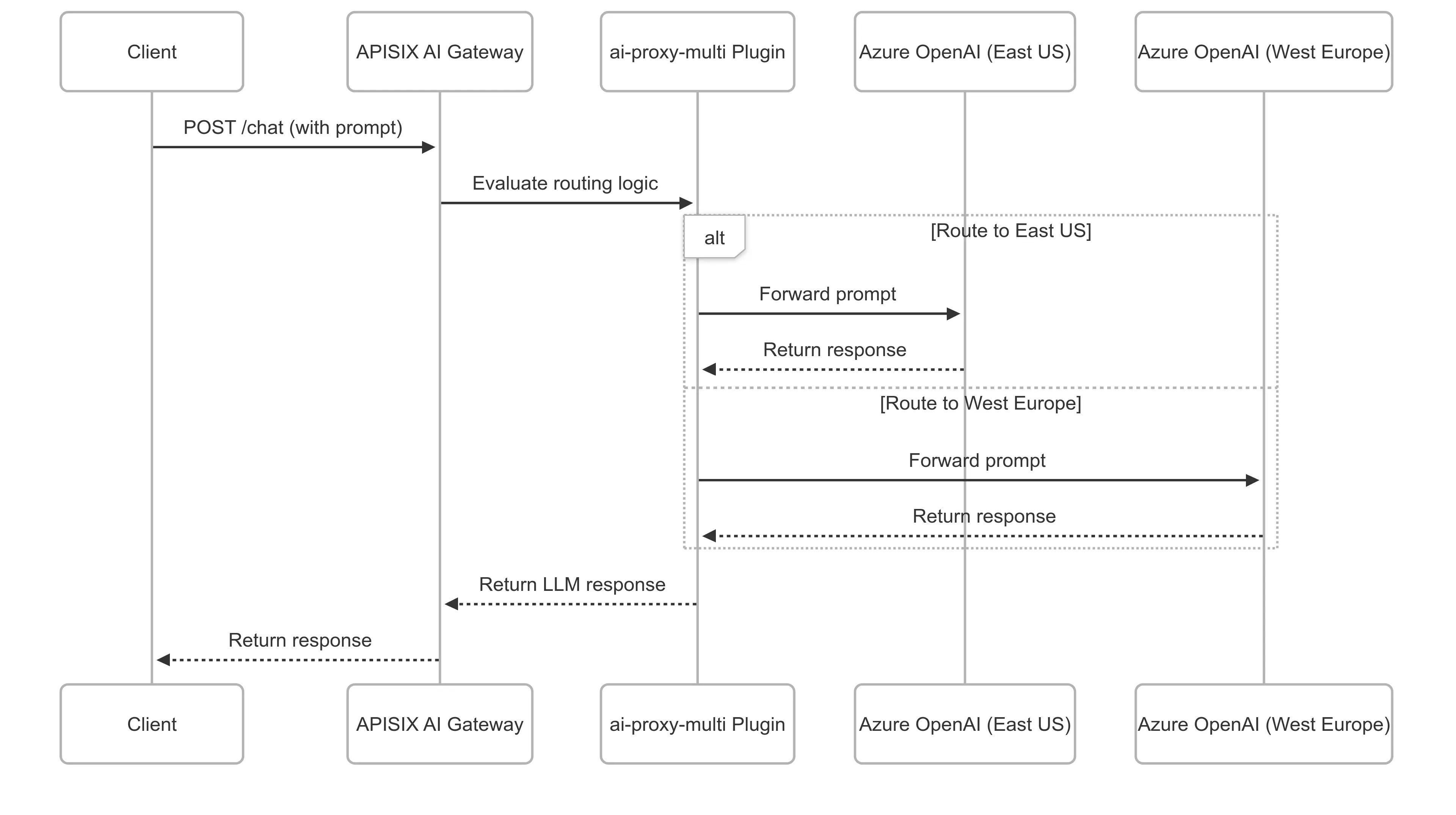
These controls can reduce provider-specific routing logic in applications, but they do not guarantee uninterrupted service. Availability still depends on healthy upstreams, network conditions, timeouts, retry limits, and the configured fallback path.
Enforce Token-Based Usage Limits
LLM requests can consume very different numbers of prompt and completion tokens. The ai-rate-limiting plugin applies limits based on token consumption rather than request count alone.
APISIX supports local and Redis-backed counters for this plugin. Operators can scope policies through gateway configuration and choose limits appropriate for their applications. The plugin records provider-reported usage after a response and rejects later requests once the observed counter has consumed the quota. A large response or concurrent requests can therefore take observed usage beyond the configured limit before later requests are rejected. Model pricing, budgets, billing, and chargeback remain external responsibilities.
Cache Completed LLM Responses
The ai-cache plugin works with ai-proxy or ai-proxy-multi to cache completed LLM responses in Redis. Exact matching is enabled by default. Teams can optionally add semantic matching, which requires a Redis deployment that provides the required Redis Search commands and a configured embedding service. The Redis integration guide pins Redis Open Source 8.10.1 for its companion lab; earlier Redis Open Source or Redis Stack releases should be pinned and tested explicitly.
Streaming responses are written only after the terminal event is received. Interrupted streams are not cached, so the plugin does not replay partial responses. Cache eligibility, isolation, expiration, bypass rules, and semantic thresholds still need to be configured for the application’s data and freshness requirements.
Cache entries are scoped by Route by default, not by Consumer. On a multi-tenant Route, authenticate each tenant and enable cache_key.include_consumer to scope entries by Consumer identity. If tenant identity comes from another trusted server-side source, add its NGINX variable through cache_key.include_vars. Unauthenticated traffic still shares the Route-level cache unless a trusted server-side variable is included; a client-controlled header alone is not a tenant boundary.
Apply Purpose-Specific Prompt and Content Controls
APISIX provides separate plugins for different kinds of prompt processing:
ai-prompt-templateapplies predefined prompt templates.ai-prompt-decoratoradds configured content before or after a prompt.ai-prompt-guardallows or denies prompts using configured regular-expression patterns.ai-aws-content-moderationintegrates with Amazon Comprehend for its documented moderation flow.ai-aliyun-content-moderationintegrates with Alibaba Cloud content moderation for its documented flow.ai-lakera-guardintegrates the Lakera Guard v2 API to inspect supported LLM requests, responses, or both when used withai-proxyorai-proxy-multi.
These controls have different scopes and failure modes. Pattern checks and provider-specific moderation do not guarantee that content is safe or compliant. Teams still need application authorization, data classification, secrets management, provider governance, and human review where required.
Add a Documented RAG Retrieval Step
The ai-rag plugin implements the retrieval flow currently documented for Azure OpenAI embeddings and Azure AI Search. It retrieves relevant context and adds that context to a supported model request.
This can centralize the documented retrieval step for compatible deployments. It is not a generic connector for every knowledge base, and it does not evaluate factual accuracy or eliminate hallucinations.
Observe AI Traffic at the Gateway
When AI proxy logging is enabled, APISIX can record model information, request duration, prompt and response token counts, and time to first token when the upstream response exposes those values. Existing logging and observability plugins can export gateway data to the team’s monitoring stack.
Gateway telemetry covers requests that pass through APISIX. It complements application traces, provider-side monitoring, user feedback, and model-quality evaluation; it does not replace them.
Use API and AI Controls in One Gateway
Apache APISIX can apply its existing routing, authentication, traffic management, and observability capabilities alongside AI-specific plugins. This lets teams operate API and configured model traffic through one open-source gateway when that architecture fits their requirements.
The practical value comes from explicit, reviewable policies rather than autonomous decision-making. Teams configure the providers, routes, cache policy, limits, prompt controls, retrieval service, and observability integrations that APISIX should use.
Conclusion
Apache APISIX adds AI traffic controls through focused plugins: provider proxying, configured multi-model and semantic routing, response caching, bounded retries and fallback, token-based limits, prompt processing, external moderation integrations, a documented Azure RAG flow, and gateway-level telemetry.
Use each capability within its documented boundary. APISIX manages traffic to model services; the surrounding application stack continues to own business authorization, agent orchestration, workflow state, model evaluation, and compliance decisions.